Taransay – OS Wallpaper Download August 2026
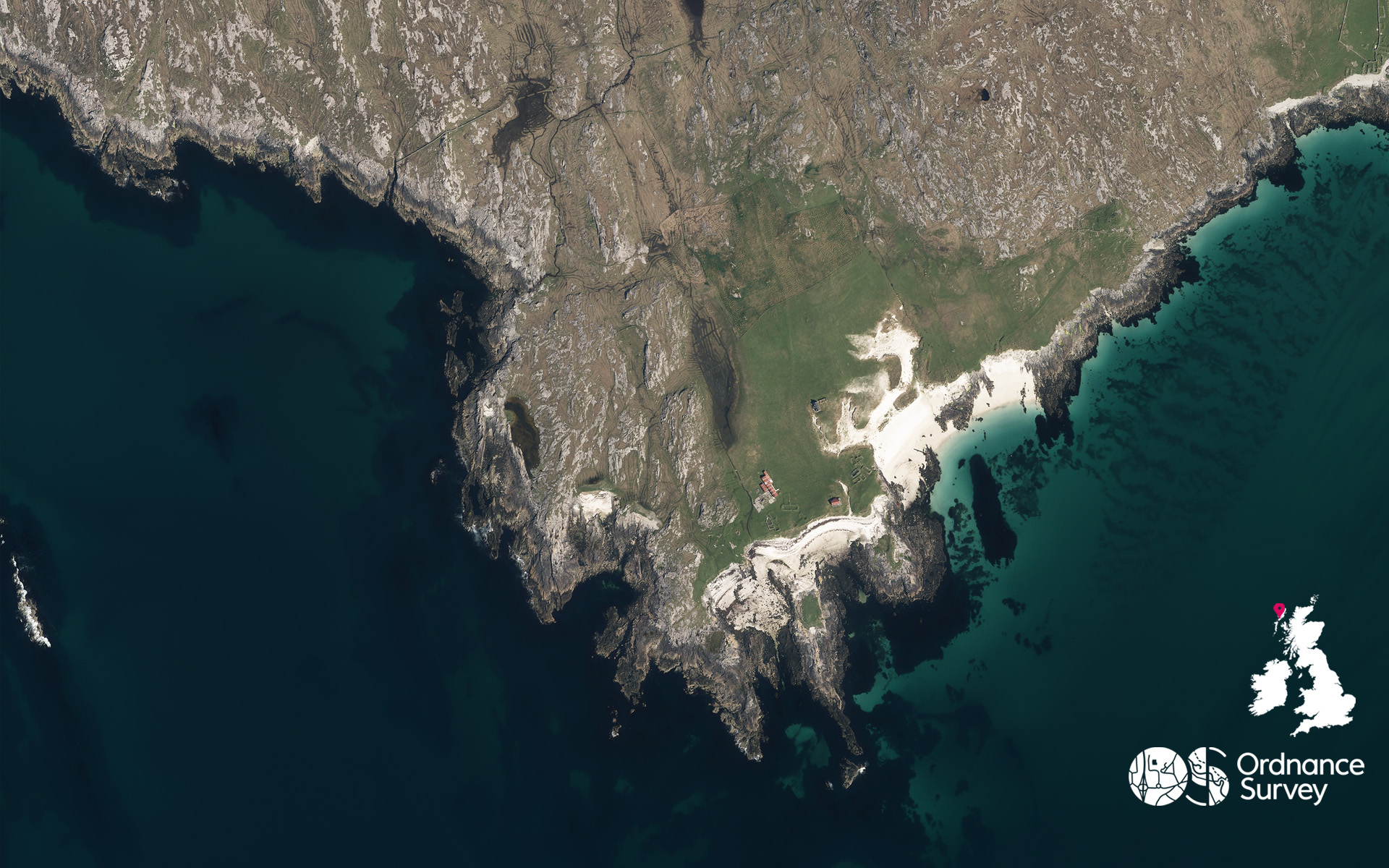
For our August wallpaper, our flying team have provided a stunning image of Taransay, an island in the Outer Hebrides of Scotland
Just a short distance from Harris, Taransay is a remote island where nature has reclaimed much of the landscape. Uninhabited since 1974, Taransay is the largest Scottish island without a permanent population, making it one of the most remote and atmospheric destinations in the Hebrides.
Taransay came to national attention in 2000 as the location for the BBC series Castaway 2000, in which 36 volunteers attempted to create a self-sufficient community on the island for a year. The series is also remembered for launching the career of Ben Fogle, then an unknown participant, now a widely recognised adventurer, writer and broadcaster.
From above, you can see the abandoned crofting township of Paiable (Paibeil), once the island’s largest settlement. The outlines of old stone houses and field systems can still be seen, silent reminders of a community that once endured life on this exposed Atlantic outpost.
For walkers, paddlers and lovers of wild places, Taransay represents a rare glimpse of Scotland at its most untamed. With no permanent residents, few modern structures and panoramic views stretching across the Outer Hebrides, the island offers a powerful sense of wilderness that is increasingly hard to find.
EXPLORE THE
OS Shop
We are with you every step of the way. Shop our trusted walking and hiking maps and guidebooks so you can explore the outdoors with confidence.
Go to the shopContribute to Discover!
We’re hoping to bring many more contributors to Discover from our own OS Champions but also any of our fans who have interesting routes, pictures and stories of their adventures to share. If you’re interested in writing for us or sharing an adventure with a OS Maps Route then please read this guide – write for Discover.
If you have an image you think we could for the next OS Wallpaper join our Facebook Group and share it with us! Just tell us where the image was taken and when.
Free Download: Desktop & Mobile OS Wallpaper Background
2560 x 1440 (also for 2048 x 1152 | 1920 x 1080 | 1600 x 900 | 1536 x 864 | 1366 x 768 |1280 x 720, plus Teams and Zoom)
1920 x 1200 (also for 1680 x 1050 | 1440 x 900 | 1280 x 800)
1366 x 768
1024 x 768 (also for iPad)
1536 x 768: For most mobile and tablet devices. For Android devices more of the image shows as you swipe between screens.
Using the downloaded wallpaper image
To save the image on a computer, right-click (or alt-click) and select ‘save target as’ or the equivalent for your browser. If you are not sure of the screen size, use the largest one.
- For most computers, right click the desktop and select ‘set wallpaper’ to change the wallpaper image.
- For iOS devices, select the image, press and hold on the image to ‘save image’, then go to Photos > Share > Set as Wallpaper.
- On Android devices, select the image, long press to ‘download image’ and then go to Wallpapers > My photos and select the image.
Did you know?
On Windows PCs you can save multiple wallpaper images to a single folder, and have your desktop background automatically change regularly by selecting that folder as the source.
You can also browse all the previous wallpapers.