Fort George – OS Wallpaper Download July 2026
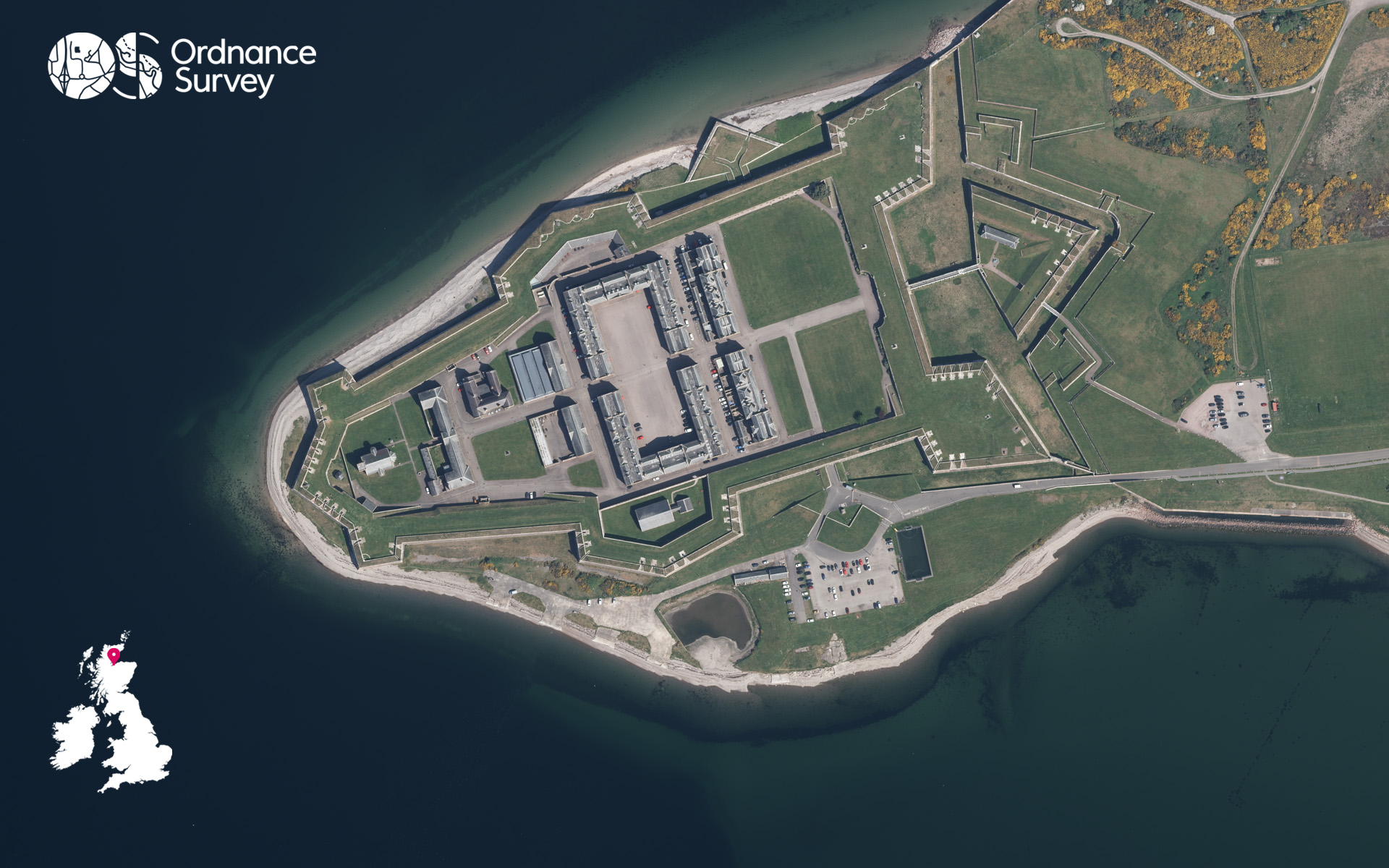
For the July wallpaper, our flying team take us to Fort George, near Ardersier.
Perched on the shores of the Moray Firth, just a short distance from Inverness, Fort George is one of Scotland’s most impressive military fortresses. Built in the aftermath of the Jacobite Rising of 1745, it was designed to be an unassailable stronghold and a lasting symbol of power in the Highlands. Its vast walls, formidable defences, and distinctive star-shaped layout create a striking sight, whether viewed from the ground or from above.
Remarkably, Fort George remains much as it was when construction was completed in 1769. As you wander through its gates, you can explore historic barracks, powerful cannons, and beautifully preserved buildings that bring centuries of military history to life. Despite being built to withstand siege and attack, the fortress has never faced battle, making it one of the finest and best-preserved military fortifications in Europe.
Set against the stunning backdrop of the Moray Firth, its ramparts provide breath-taking panoramic views across the water. Visitors can enjoy a leisurely walk along the fortress walls, often spotting dolphins swimming below while taking in the spectacular coastal scenery. Combining heritage, dramatic landscapes, and remarkable architecture, Fort George stands as one of the Highlands’ most memorable and rewarding attractions.
If you’re inspired to take a trip to Fort George, don’t forget to visit nearby Inverness for a wide range of urban walks.
EXPLORE THE
OS Shop
We are with you every step of the way. Shop our trusted walking and hiking maps and guidebooks so you can explore the outdoors with confidence.
Go to the shopContribute to Discover!
We’re hoping to bring many more contributors to Discover from our own OS Champions but also any of our fans who have interesting routes, pictures and stories of their adventures to share. If you’re interested in writing for us or sharing an adventure with a OS Maps Route then please read this guide – write for Discover.
If you have an image you think we could for the next OS Wallpaper join our Facebook Group and share it with us! Just tell us where the image was taken and when.
Free Download: Desktop & Mobile OS Wallpaper Background
2560 x 1440 (also for 2048 x 1152 | 1920 x 1080 | 1600 x 900 | 1536 x 864 | 1366 x 768 |1280 x 720, plus Teams and Zoom)
1920 x 1200 (also for 1680 x 1050 | 1440 x 900 | 1280 x 800)
1366 x 768
1024 x 768 (also for iPad)
1536 x 768: For most mobile and tablet devices. For Android devices more of the image shows as you swipe between screens.
Using the downloaded wallpaper image
To save the image on a computer, right-click (or alt-click) and select ‘save target as’ or the equivalent for your browser. If you are not sure of the screen size, use the largest one.
- For most computers, right click the desktop and select ‘set wallpaper’ to change the wallpaper image.
- For iOS devices, select the image, press and hold on the image to ‘save image’, then go to Photos > Share > Set as Wallpaper.
- On Android devices, select the image, long press to ‘download image’ and then go to Wallpapers > My photos and select the image.
Did you know?
On Windows PCs you can save multiple wallpaper images to a single folder, and have your desktop background automatically change regularly by selecting that folder as the source.
You can also browse all the previous wallpapers.