Fistral Beach & Newquay – OS Wallpaper Download September 2026
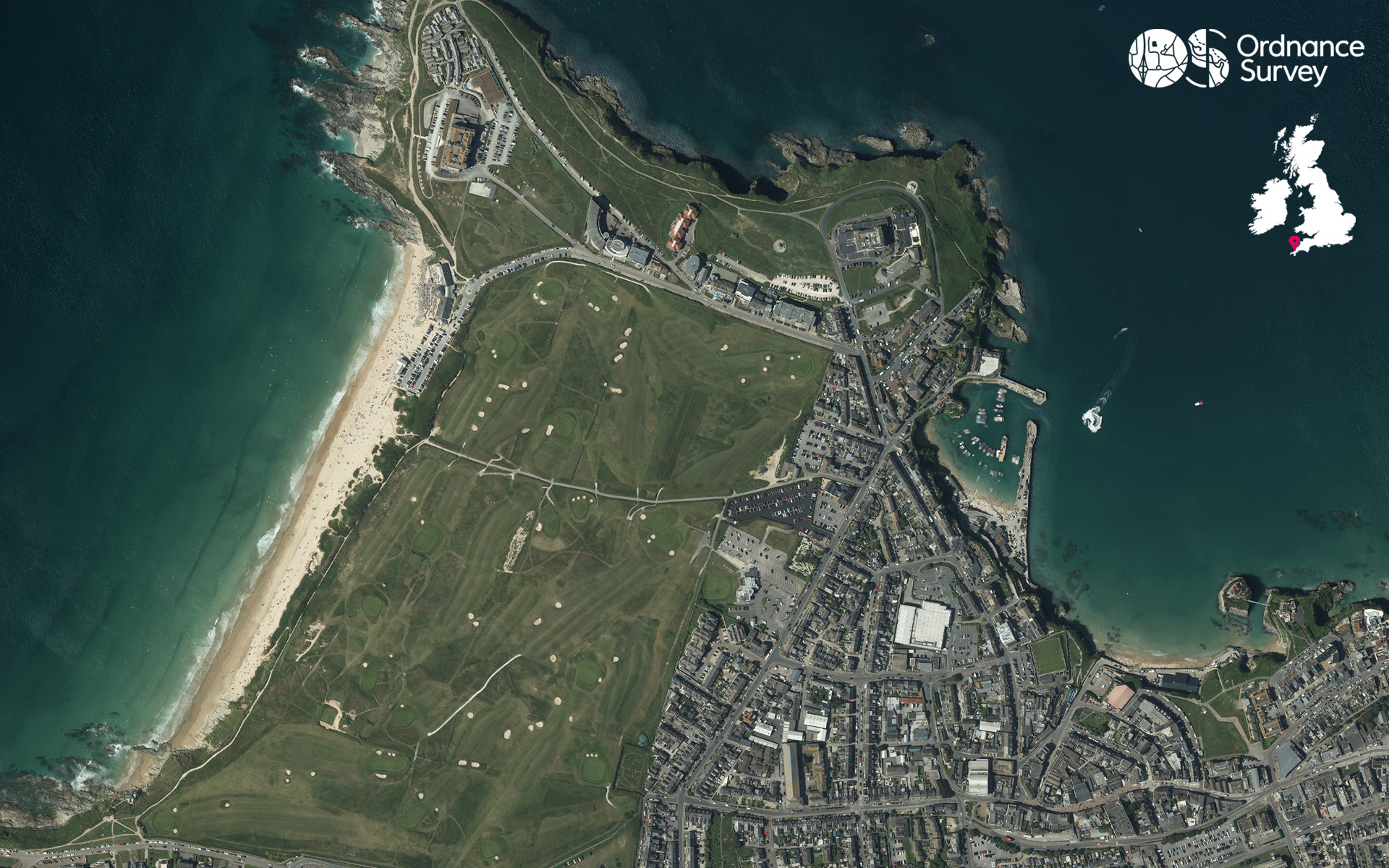
This month’s wallpaper from our flying team is of Fistral Beach and Newquay, Cornwall.
Overlooking the Atlantic Ocean, Fistral Beach is one of Cornwall’s most iconic stretches of coastline and a favourite destination for surfers from across the UK. The beach’s wide expanse of golden sand and consistent waves make it a year-round hub for watersports.
Beyond the surf, Fistral is a fantastic place to slow down and take in the coastal scenery. It offers the perfect location for a beachside stroll, watching the sunset, or spotting wildlife along the cliffs.
Beyond the beach, the vibrant town of Newquay offers a perfect base for outdoor adventure and exploration. Surrounded by dramatic headlands, hidden coves and miles of South West Coast Path, the area is packed with opportunities for walking and discovering Cornwall’s rugged beauty.
Follow the coastline to panoramic viewpoints, explore neighbouring beaches such as Crantock and Watergate Bay, or simply wander the town’s bustling harbour and seafront for a perfect Cornish break.
EXPLORE THE
OS Shop
We are with you every step of the way. Shop our trusted walking and hiking maps and guidebooks so you can explore the outdoors with confidence.
Go to the shopContribute to Discover!
We’re hoping to bring many more contributors to Discover from our own OS Champions but also any of our fans who have interesting routes, pictures and stories of their adventures to share. If you’re interested in writing for us or sharing an adventure with a OS Maps Route then please read this guide – write for Discover.
If you have an image you think we could for the next OS Wallpaper join our Facebook Group and share it with us! Just tell us where the image was taken and when.
Free Download: Desktop & Mobile OS Wallpaper Background
2560 x 1440 (also for 2048 x 1152 | 1920 x 1080 | 1600 x 900 | 1536 x 864 | 1366 x 768 |1280 x 720, plus Teams and Zoom)
1920 x 1200 (also for 1680 x 1050 | 1440 x 900 | 1280 x 800)
1366 x 768
1024 x 768 (also for iPad)
1536 x 768: For most mobile and tablet devices. For Android devices more of the image shows as you swipe between screens.
Using the downloaded wallpaper image
To save the image on a computer, right-click (or alt-click) and select ‘save target as’ or the equivalent for your browser. If you are not sure of the screen size, use the largest one.
- For most computers, right click the desktop and select ‘set wallpaper’ to change the wallpaper image.
- For iOS devices, select the image, press and hold on the image to ‘save image’, then go to Photos > Share > Set as Wallpaper.
- On Android devices, select the image, long press to ‘download image’ and then go to Wallpapers > My photos and select the image.
Did you know?
On Windows PCs you can save multiple wallpaper images to a single folder, and have your desktop background automatically change regularly by selecting that folder as the source.
You can also browse all the previous wallpapers.